

 Re-mark
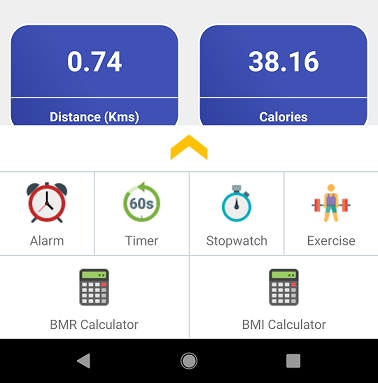
Hii developer in this Article I am sharing Android development how to used bottom Sheet. Android Bottom Sheet component slides up from the bottom showing more relevant content. You can notice bottom sheets in apps like map apps (bottom sheet reveals location, directions information), music players (Play bar sticks to bottom and opens when swipe up and also open With button click ). The bottom sheet is the component of the android design support library. Android Different type of Bottom Sheets Persistent Bottom Sheet: The Persistent bottom sheet displays in-app content. It will be displayed at the bottom of the screen making some portion of the content visible. When activated it opens the full content. The elevation of the persistent bottom sheet is the same as the app making it part of the app. Example Google Maps app. Modal Bottom Sheet: The Modal bottom sheets have a higher elevation. These usually replaces menus or dialogs. Generally, modal bottom sheets used to show deep-linked content from other apps. example Google Drive app Let,s Start to make an Android Bootem Sheet example.